Overview
About Punch-Out!!
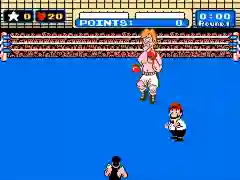
Punch-Out!! is a sports game for NES, released in 1987.
Choose an easy situation and run the same play a few times. Change your position or timing between attempts, but not both, so you can see what actually makes the result better.
How to Play Punch-Out!! in Your Browser
- Open the player. Select Start Game inside the game window if you see that button. This launches the browser player; it is separate from the Start input used inside the game.
- Wait for the game screen. Let the NES game finish loading before pressing any keys. If you get an error before play starts, try reloading the page once on a stable connection.
- Check an input. Click inside the game window and test one direction, then one action. For a connected gamepad, open Control Settings and check how the player assigned its buttons.
Use the on-screen controls if your browser shows them. Landscape orientation can give you more room; if pressing two inputs together is awkward, try a compatible gamepad or a desktop keyboard.
Punch-Out!! Controls
| Keyboard | Controller input |
|---|---|
| Arrow keys | D-pad |
| Z / X | A / B |
| Enter | Start |
| V | Select |
These are default player-one bindings. What a controller button does depends on the game and its current menu or mode. If you changed a binding in Control Settings, use that assignment instead.
Punch-Out!! Tips
- What to try first. Watch the boxer across from you rather than staring at your own gloves. Dodge a recognizable windup, then try one punch the moment the opening appears.
- Read the setup. Look at the positions on screen before committing to a move. Get into a useful spot before pressing the action button.
- Practice the release. Choose a repeatable cue rather than guessing the moment. Check the result and adjust earlier or later on the next attempt.
- Play for the next move. When a risky attempt would leave you out of position, choose a safer action. You can take a harder chance once you have a clean setup.
Games Like Punch-Out!!
- Mike Tyson's Punch-Out!!: Another sports game on NES; practice one repeatable play before adding variety.
- Super Punch-Out!!: Try a sports game on SNES and compare how it handles the same kind of decisions.
- WWF SmackDown! 2: Try a sports game on PlayStation and compare how it handles the same kind of decisions.
- FIFA 2000: Try a sports game on PlayStation and compare how it handles the same kind of decisions.
- Pro Evolution Soccer 2: Try a sports game on PlayStation and compare how it handles the same kind of decisions.